lst = [
    [1]*500,
    dict(a=[2]*100,b='123'),
    'python',
    (1,2,[3,4])
]
#lst08wk-1: 모듈설치 및 변경

1. 강의영상
2. 내가 만든 좋은 함수
# 예시1 – my_show_list()
- 리스트의구조를 잘 살펴볼 수 있는 함수를 만들어보자..
from collections.abc import Iterable

def my_show_list(item, max_depth=2, max_items=5):
    """Displays type, length, and content of nested items up to level 2."""

    # Level 1 information
    item_type = type(item).__name__
    try:
        item_len = len(item)
    except TypeError:
        item_len = None  # If length cannot be determined

    item_str = repr(item)
    if len(item_str) > 50:
        content = f"{item_str[:25]} ... {item_str[-25:]}"
    else:
        content = item_str

    info = f"Level 1 - Type: {item_type}"
    if item_len is not None:
        info += f", Length: {item_len}"
    info += f", Content: {content}"
    print(info)

    # Level 2 information (only if item is Iterable)
    if isinstance(item, Iterable) and not isinstance(item, (str, bytes)):
        if item_len is None:
            return  # Skip if length cannot be determined
        for idx, subitem in enumerate(item):
            if idx == max_items // 2 and item_len > max_items:
                print(f"     ...")
            elif idx >= max_items and idx < item_len - max_items // 2:
                continue

            subitem_type = type(subitem).__name__
            try:
                subitem_len = len(subitem)
            except TypeError:
                subitem_len = None

            subitem_str = repr(subitem)
            if len(subitem_str) > 50:
                sub_content = f"{subitem_str[:25]} ... {subitem_str[-25:]}"
            else:
                sub_content = subitem_str

            sub_info = f"     Level 2 - Type: {subitem_type}"
            if subitem_len is not None:
                sub_info += f", Length: {subitem_len}"
            sub_info += f", Content: {sub_content}"
            print(sub_info)
- 사용해보자.
my_show_list(lst)Level 1 - Type: list, Length: 4, Content: [[1, 1, 1, 1, 1, 1, 1, 1, ... 'python', (1, 2, [3, 4])]
Level 2 - Type: list, Length: 500, Content: [1, 1, 1, 1, 1, 1, 1, 1, ... , 1, 1, 1, 1, 1, 1, 1, 1]
Level 2 - Type: dict, Length: 2, Content: {'a': [2, 2, 2, 2, 2, 2, ... 2, 2, 2, 2], 'b': '123'}
Level 2 - Type: str, Length: 6, Content: 'python'
Level 2 - Type: tuple, Length: 3, Content: (1, 2, [3, 4])my_show_list(lst[-1])Level 1 - Type: tuple, Length: 3, Content: (1, 2, [3, 4])
Level 2 - Type: int, Content: 1
Level 2 - Type: int, Content: 2
Level 2 - Type: list, Length: 2, Content: [3, 4]#
# 예제2 – my_show_dict()
import numpy as np
import torch
dct = dict(
    lst = [1,2,3]*100,
    tpl = (2,3,4),
    np_array = np.random.randn(100),
    torch = torch.tensor([1])
)
#dct
def my_show_dict(dct):
print("Dictionary Overview:")
print(f"Total keys: {len(dct.keys())}")
print(f"Keys: {list(dct.keys())}\n")
for i, (k, v) in enumerate(dct.items()):
print(f"{i+1}. Key: '{k}'")
print(f" - Type: {type(v).__name__}")
# 길이 확인이 가능한 타입인 경우 길이 정보 출력
if hasattr(v, "__len__"):
print(f" - Length: {len(v)}")
# Iterable 값의 길이를 제한해 출력
if len(str(v)) > 100:
display_values = str(v)[:100] + "..." # 문자열 길이 제한 후 생략 표시
else:
display_values = str(v)
# 값 출력
print(f" - Values: {display_values}")
print() # 공백 줄 추가my_show_dict(dct)Dictionary Overview:
Total keys: 4
Keys: ['lst', 'tpl', 'np_array', 'torch']
1. Key: 'lst'
- Type: list
- Length: 300
- Values: [1, 2, 3, 1, 2, 3, 1, 2, 3, 1, 2, 3, 1, 2, 3, 1, 2, 3, 1, 2, 3, 1, 2, 3, 1, 2, 3, 1, 2, 3, 1, 2, 3, ...
2. Key: 'tpl'
- Type: tuple
- Length: 3
- Values: (2, 3, 4)
3. Key: 'np_array'
- Type: ndarray
- Length: 100
- Values: [-7.17493471e-01 6.35787670e-01 -8.11273743e-01 1.49924972e+00
-5.57618169e-01 7.19155061e-01 2...
4. Key: 'torch'
- Type: Tensor
- Length: 1
- Values: tensor([1])
#
# 예제3 – imdb
import transformers
import datasets
/home/cgb3/anaconda3/envs/hf/lib/python3.12/site-packages/tqdm/auto.py:21: TqdmWarning: IProgress not found. Please update jupyter and ipywidgets. See https://ipywidgets.readthedocs.io/en/stable/user_install.html
from .autonotebook import tqdm as notebook_tqdmimdb = datasets.load_dataset('imdb')
imdbDatasetDict({
train: Dataset({
features: ['text', 'label'],
num_rows: 25000
})
test: Dataset({
features: ['text', 'label'],
num_rows: 25000
})
unsupervised: Dataset({
features: ['text', 'label'],
num_rows: 50000
})
})my_show_dict(imdb)Dictionary Overview:
Total keys: 3
Keys: ['train', 'test', 'unsupervised']
1. Key: 'train'
- Type: Dataset
- Length: 25000
- Values: Dataset({
features: ['text', 'label'],
num_rows: 25000
})
2. Key: 'test'
- Type: Dataset
- Length: 25000
- Values: Dataset({
features: ['text', 'label'],
num_rows: 25000
})
3. Key: 'unsupervised'
- Type: Dataset
- Length: 50000
- Values: Dataset({
features: ['text', 'label'],
num_rows: 50000
})
my_show_list(imdb['train'])Level 1 - Type: Dataset, Length: 25000, Content: Dataset({
features: [ ... ],
num_rows: 25000
})
Level 2 - Type: dict, Length: 2, Content: {'text': 'I rented I AM C ... of a plot.', 'label': 0}
Level 2 - Type: dict, Length: 2, Content: {'text': '"I Am Curious: ... \'s bodies.', 'label': 0}
...
Level 2 - Type: dict, Length: 2, Content: {'text': "If only to avoi ... br /><br />", 'label': 0}
Level 2 - Type: dict, Length: 2, Content: {'text': "This film was p ... lace. 2/10.", 'label': 0}
Level 2 - Type: dict, Length: 2, Content: {'text': 'Oh, brother...a ... br /><br />', 'label': 0}
Level 2 - Type: dict, Length: 2, Content: {'text': '\'The Adventure ... employed...', 'label': 1}
Level 2 - Type: dict, Length: 2, Content: {'text': 'The story cente ... highlights.', 'label': 1}my_show_dict(imdb['train'][0])Dictionary Overview:
Total keys: 2
Keys: ['text', 'label']
1. Key: 'text'
- Type: str
- Length: 1640
- Values: I rented I AM CURIOUS-YELLOW from my video store because of all the controversy that surrounded it w...
2. Key: 'label'
- Type: int
- Values: 0
#
3. 모듈
- 이거 생각보다 좋음 \(\to\) 다음에도 쓰고 싶음
- 방법1: 코드를 어디에 잘 저장해둠.. 코랩킬때마다 불러서 읽어옴
- 방법2: 패키지화 시킴
- 방법2를 살펴보자.
A. 위치
#!pip install git+https://github.com/guebin/mp2024pkg.git- numpy가 설치된 위치를 알아보자.
# '/usr/local/lib/python3.10/dist-packages/numpy'
# 여기에 있음..
- numpy폴더는 있고 mp2024pkg 폴더는 없음..
- 그래서 numpy는 임포트되는데 mp2024pkg는 임포트되지 않음
import mp2024pkgModuleNotFoundError: No module named 'mp2024pkg'B. 설치
- mp2024pkg install (=download)
!pip install git+https://github.com/guebin/mp2024pkg.git
# 이걸 실행하면
# '/usr/local/lib/python3.10/dist-packages'
# 여기에서 mp2024pkg라는 폴더가 생김
Collecting git+https://github.com/guebin/mp2024pkg.git
Cloning https://github.com/guebin/mp2024pkg.git to /tmp/pip-req-build-ctyecrwe
Running command git clone --filter=blob:none --quiet https://github.com/guebin/mp2024pkg.git /tmp/pip-req-build-ctyecrwe
Resolved https://github.com/guebin/mp2024pkg.git to commit bd3e63bfe6a50d78c955b42236511e7c90786291
Preparing metadata (setup.py) ... done#!pip uninstall mp2024pkg -y
# 이걸 실행하면 위에서 생긴 폴더가 삭제Found existing installation: mp2024pkg 1.0
Uninstalling mp2024pkg-1.0:
Successfully uninstalled mp2024pkg-1.0- 생성된 mp2024pkg 폴더의 내용 – 깃허브에 있는 폴더 그대로 다운로드됨..
- import
import mp2024pkg- 사용
mp2024pkg.show_list(lst)Level 1 - Type: list, Length: 4, Content: [[1, 1, 1, 1, 1, 1, 1, 1, ... 'python', (1, 2, [3, 4])]
Level 2 - Type: list, Length: 500, Content: [1, 1, 1, 1, 1, 1, 1, 1, ... , 1, 1, 1, 1, 1, 1, 1, 1]
Level 2 - Type: dict, Length: 2, Content: {'a': [2, 2, 2, 2, 2, 2, ... 2, 2, 2, 2], 'b': '123'}
Level 2 - Type: str, Length: 6, Content: 'python'
Level 2 - Type: tuple, Length: 3, Content: (1, 2, [3, 4])mp2024pkg.show_dict(dct)Dictionary Overview:
Total keys: 4
Keys: ['lst', 'tpl', 'np_array', 'torch']
1. Key: 'lst'
- Type: list
- Length: 300
- Values: [1, 2, 3, 1, 2, 3, 1, 2, 3, 1, 2, 3, 1, 2, 3, 1, 2, 3, 1, 2, 3, 1, 2, 3, 1, 2, 3, 1, 2, 3, 1, 2, 3, ...
2. Key: 'tpl'
- Type: tuple
- Length: 3
- Values: (2, 3, 4)
3. Key: 'np_array'
- Type: ndarray
- Length: 100
- Values: [-7.17493471e-01 6.35787670e-01 -8.11273743e-01 1.49924972e+00
-5.57618169e-01 7.19155061e-01 2...
4. Key: 'torch'
- Type: Tensor
- Length: 1
- Values: tensor([1])
C. 변경
- mp2024pkg 폴더로 show_list 함수가 정의된 부분 변경
mp2024pkg.show_list([1,2,[3,4]])이거 최규빈이 만들었음 2024.11.1
Level 1 - Type: list, Length: 3, Content: [1, 2, [3, 4]]
Level 2 - Type: int, Content: 1
Level 2 - Type: int, Content: 2
Level 2 - Type: list, Length: 2, Content: [3, 4]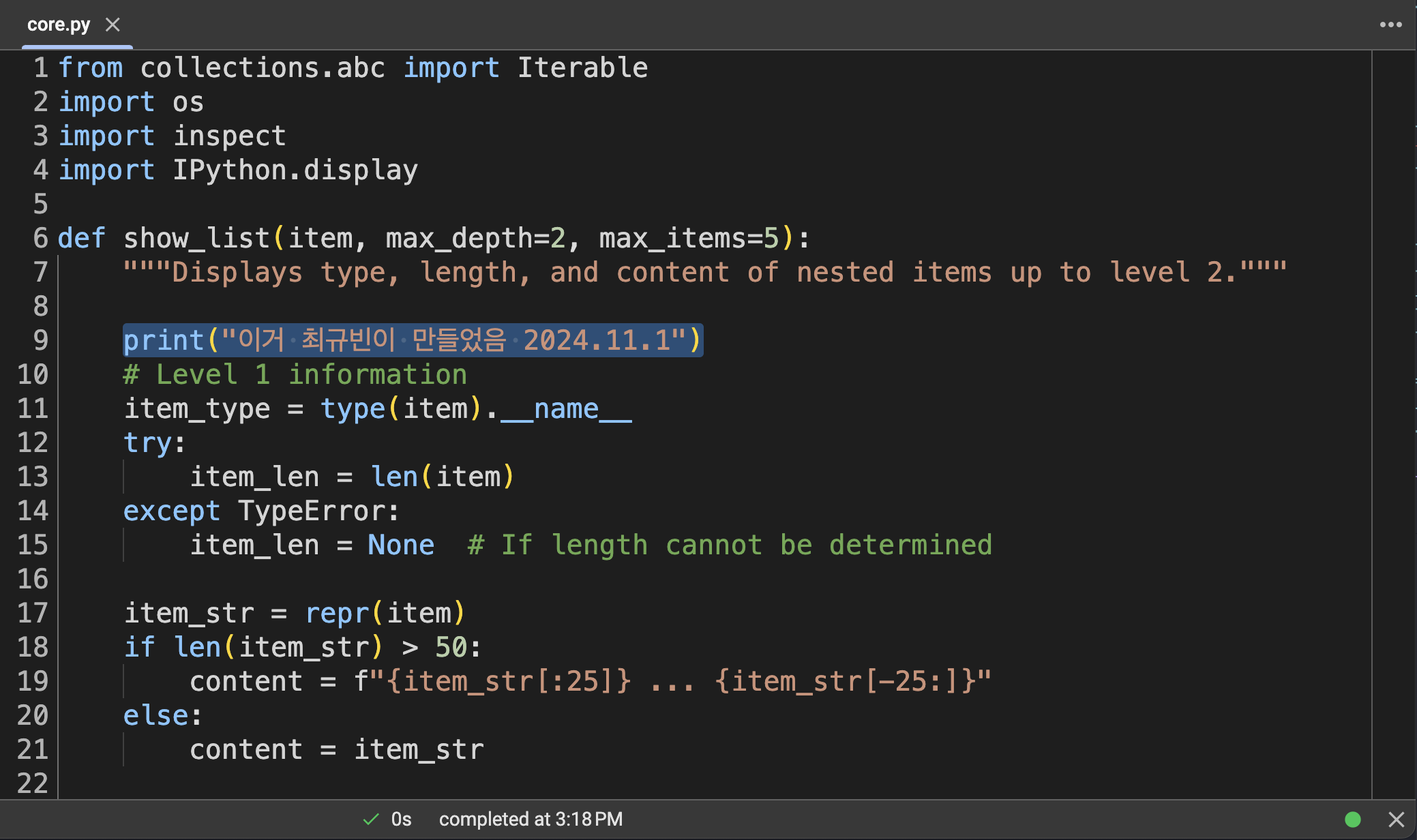
참고: 촬영당시에는 (2024년11월1일) mp2024pkg에 정의한 함수가 2개였지만 이후에 몇가지 함수가 더 추가되었습니다.
- 커널재시작후 다시 import
import mp2024pkg- 변경된 내용 확인
mp2024pkg.show_list([1,2,[3,4]])이거 최규빈이 만들었음 2024.11.1
Level 1 - Type: list, Length: 3, Content: [1, 2, [3, 4]]
Level 2 - Type: int, Content: 1
Level 2 - Type: int, Content: 2
Level 2 - Type: list, Length: 2, Content: [3, 4]D. 로드
# !rm -rf /usr/local/lib/python3.10/dist-packages/mp2024pkg
# !rm -rf /usr/local/lib/python3.10/dist-packages/mp2024pkg-1.0.dist-info
#!pip install git+https://github.com/guebin/mp2024pkg.git# 예시1
import mp2024pkgmp2024pkg.show_dict({'a':[1,2,3],'b':[2,3,4]})Dictionary Overview:
Total keys: 2
Keys: ['a', 'b']
1. Key: 'a'
- Type: list
- Length: 3
- Values: [1, 2, 3]
2. Key: 'b'
- Type: list
- Length: 3
- Values: [2, 3, 4]
mp2024pkg.show_list([[1],[1,2]])Level 1 - Type: list, Length: 2, Content: [[1], [1, 2]]
Level 2 - Type: list, Length: 1, Content: [1]
Level 2 - Type: list, Length: 2, Content: [1, 2]show_list([[1],[1,2]])NameError: name 'show_list' is not defined#
# 예시2
from mp2024pkg import show_listmp2024pkg.show_list([[1],[1,2]])NameError: name 'mp2024pkg' is not definedshow_list([[1],[1,2]])Level 1 - Type: list, Length: 2, Content: [[1], [1, 2]]
Level 2 - Type: list, Length: 1, Content: [1]
Level 2 - Type: list, Length: 2, Content: [1, 2]#
# 예시3
import mp2024pkg as mpmp2024pkg.show_list([[1],[1,2]])NameError: name 'mp2024pkg' is not definedshow_list([[1],[1,2]])NameError: name 'show_list' is not definedmp.show_dict({'a':[1,2,3],'b':[2,3,4]})Dictionary Overview:
Total keys: 2
Keys: ['a', 'b']
1. Key: 'a'
- Type: list
- Length: 3
- Values: [1, 2, 3]
2. Key: 'b'
- Type: list
- Length: 3
- Values: [2, 3, 4]
mp.show_list([[1],[1,2]])Level 1 - Type: list, Length: 2, Content: [[1], [1, 2]]
Level 2 - Type: list, Length: 1, Content: [1]
Level 2 - Type: list, Length: 2, Content: [1, 2]#
# 예시5
from mp2024pkg import *show_dict({'a':[1,2,3],'b':[2,3,4]})Dictionary Overview:
Total keys: 2
Keys: ['a', 'b']
1. Key: 'a'
- Type: list
- Length: 3
- Values: [1, 2, 3]
2. Key: 'b'
- Type: list
- Length: 3
- Values: [2, 3, 4]
show_list([[1],[1,2]])Level 1 - Type: list, Length: 2, Content: [[1], [1, 2]]
Level 2 - Type: list, Length: 1, Content: [1]
Level 2 - Type: list, Length: 2, Content: [1, 2]#
# 예시6
from mp2024pkg import show_dict as sdsd({'a':[1,2,3],'b':[2,3,4]})Dictionary Overview:
Total keys: 2
Keys: ['a', 'b']
1. Key: 'a'
- Type: list
- Length: 3
- Values: [1, 2, 3]
2. Key: 'b'
- Type: list
- Length: 3
- Values: [2, 3, 4]
#
# 예시7
from mp2024pkg import show_dict as sd
import mp2024pkgsd({'a':[1,2,3],'b':[2,3,4]})Dictionary Overview:
Total keys: 2
Keys: ['a', 'b']
1. Key: 'a'
- Type: list
- Length: 3
- Values: [1, 2, 3]
2. Key: 'b'
- Type: list
- Length: 3
- Values: [2, 3, 4]
mp2024pkg.show_dict({'a':[1,2,3],'b':[2,3,4]})Dictionary Overview:
Total keys: 2
Keys: ['a', 'b']
1. Key: 'a'
- Type: list
- Length: 3
- Values: [1, 2, 3]
2. Key: 'b'
- Type: list
- Length: 3
- Values: [2, 3, 4]
mp2024pkg.show_list([1,2,[3]])Level 1 - Type: list, Length: 3, Content: [1, 2, [3]]
Level 2 - Type: int, Content: 1
Level 2 - Type: int, Content: 2
Level 2 - Type: list, Length: 1, Content: [3]#
4. 모듈, 패키지, 라이브러리??
- 모듈은 import를 하여 생기게 되는 오브젝트를 의미한다.
import numpy as np
type(np)module- 컴퓨터공학과 교수님들: 모듈이 모이면 패키지라고 부른다. 그리고 라이브러리는 패키지보다 큰 개념이다.
- 그런데 구분이 모호하다.
np의 type은 모듈이라고 나옴..- 그런데 numpy package 라고 검색하면 검색가능함.
- 심지어 numpy library 라고 검색해도 검색가능하다.
- 제 생각: 넘파이모듈, 넘파이패키지, 넘파이라이브러리 다 맞는 말임..