import torch
import matplotlib.pyplot as plt
import numpy as np02wk-1: 회귀분석 (2) – Step1~4 / 벡터미분

1. 강의영상
2. Imports
3. 회귀모형
A. 소설
- 카페주인인 박혜원씨는 온도와 아이스아메리카노 판매량이 관계가 있다는 것을 알았다. 구체적으로는
“온도가 높아질 수록 (=날씨가 더울수록) 아이스아메리카노의 판매량이 증가”
한다는 사실을 알게 되었다. 박혜원씨는
일기예보를 보고 오늘의 평균 기온을 입력하면, 오늘의 아이스아메리카노 판매량을 미리 예측할 수 있지 않을까? 그 예측량만큼 아이스아메리카노를 준비하면 장사에 도움이 되지 않을까???
라는 생각을 하게 되었고 이를 위하여 아래와 같이 100개의 데이터를 모았다.
temp = [-2.4821, -2.3621, -1.9973, -1.6239, -1.4792, -1.4635, -1.4509, -1.4435,
-1.3722, -1.3079, -1.1904, -1.1092, -1.1054, -1.0875, -0.9469, -0.9319,
-0.8643, -0.7858, -0.7549, -0.7421, -0.6948, -0.6103, -0.5830, -0.5621,
-0.5506, -0.5058, -0.4806, -0.4738, -0.4710, -0.4676, -0.3874, -0.3719,
-0.3688, -0.3159, -0.2775, -0.2772, -0.2734, -0.2721, -0.2668, -0.2155,
-0.2000, -0.1816, -0.1708, -0.1565, -0.1448, -0.1361, -0.1057, -0.0603,
-0.0559, -0.0214, 0.0655, 0.0684, 0.1195, 0.1420, 0.1521, 0.1568,
0.2646, 0.2656, 0.3157, 0.3220, 0.3461, 0.3984, 0.4190, 0.5443,
0.5579, 0.5913, 0.6148, 0.6469, 0.6469, 0.6523, 0.6674, 0.7059,
0.7141, 0.7822, 0.8154, 0.8668, 0.9291, 0.9804, 0.9853, 0.9941,
1.0376, 1.0393, 1.0697, 1.1024, 1.1126, 1.1532, 1.2289, 1.3403,
1.3494, 1.4279, 1.4994, 1.5031, 1.5437, 1.6789, 2.0832, 2.2444,
2.3935, 2.6056, 2.6057, 2.6632]sales= [-8.5420, -6.5767, -5.9496, -4.4794, -4.2516, -3.1326, -4.0239, -4.1862,
-3.3403, -2.2027, -2.0262, -2.5619, -1.3353, -2.0466, -0.4664, -1.3513,
-1.6472, -0.1089, -0.3071, -0.6299, -0.0438, 0.4163, 0.4166, -0.0943,
0.2662, 0.4591, 0.8905, 0.8998, 0.6314, 1.3845, 0.8085, 1.2594,
1.1211, 1.9232, 1.0619, 1.3552, 2.1161, 1.1437, 1.6245, 1.7639,
1.6022, 1.7465, 0.9830, 1.7824, 2.1116, 2.8621, 2.1165, 1.5226,
2.5572, 2.8361, 3.3956, 2.0679, 2.8140, 3.4852, 3.6059, 2.5966,
2.8854, 3.9173, 3.6527, 4.1029, 4.3125, 3.4026, 3.2180, 4.5686,
4.3772, 4.3075, 4.4895, 4.4827, 5.3170, 5.4987, 5.4632, 6.0328,
5.2842, 5.0539, 5.4538, 6.0337, 5.7250, 5.7587, 6.2020, 6.5992,
6.4621, 6.5140, 6.6846, 7.3497, 8.0909, 7.0794, 6.8667, 7.4229,
7.2544, 7.1967, 9.5006, 9.0339, 7.4887, 9.0759, 11.0946, 10.3260,
12.2665, 13.0983, 12.5468, 13.8340]여기에서 temp는 평균기온이고, sales는 아이스아메리카노 판매량이다.1 평균기온과 판매량의 그래프를 그려보면 아래와 같다.
1 판매량이 소수점이고 심지어 음수인것은 그냥 그려러니 하자..
plt.plot(temp,sales,'o')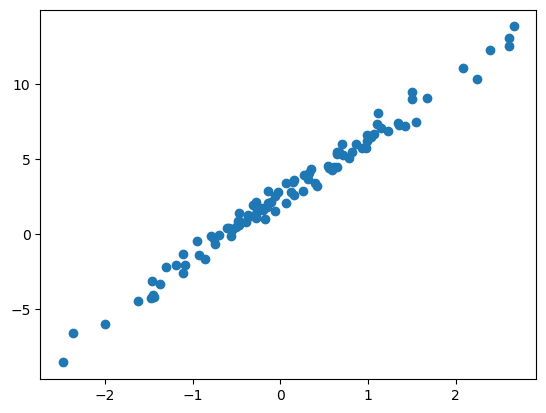
B. 모델링
- 산점도를 살펴본 박혜원씨는 평균기온이 올라갈수록 아이스아메리카노 판매량이 “선형적”으로 증가한다는 사실을 캐치했다. 물론 약간의 오차는 있어보였다. 오차까지 고려하여 평균기온과 아이스판매량의 관계를 추정하면 아래와 같이 생각할 수 있다.
아이스아메리카노 판매량 \(\approx\) \(w_0\) \(+\) \(w_1\) \(\times\) 평균기온
위의 수식에서 만약에 \(w_0\)와 \(w_1\)의 값을 적절히 추정한다면, 평균기온량을 입력으로 하였을때 아이스아메리카노 판매량을 예측할 수 있을 것이다.
- 아이스크림 판매량을 \(y_i\)로, 평균기온을 \(x_i\)로 변수화한뒤 박혜원의 수식을 좀 더 수학적으로 표현하면
\[y_i \approx w_0 + w_1 x_i,\quad i=1,2,\dots,100\]
와 같이 쓸 수 있다. 오차항을 포함하여 좀 더 엄밀하게 쓰면
\[y_i = w_0 + w_1 x_i + \epsilon_i,\quad i=1,2,\dots,100\]
와 같이 나타낼 수 있어보인다. 여기에서 \(\epsilon_i \sim N(0,\sigma^2)\) 로 가정해도 무방할 듯 하다. 그런데 이를 다시 아래와 같이 표현하는 것이 가능하다.
\[{\bf y}={\bf X}{\bf W} +\boldsymbol{\epsilon}\]
단 여기에서
\[{\bf y}=\begin{bmatrix} y_1 \\ y_2 \\ \dots \\ y_n\end{bmatrix}, \quad {\bf x}=\begin{bmatrix} x_1 \\ x_2 \\ \dots \\ x_n\end{bmatrix}, \quad {\bf X}=\begin{bmatrix} {\bf 1} & {\bf x} \end{bmatrix}=\begin{bmatrix} 1 & x_1 \\ 1 & x_2 \\ \dots \\ 1 & x_n\end{bmatrix}, \quad {\bf W}=\begin{bmatrix} w_0 \\ w_1 \end{bmatrix}, \quad \boldsymbol{\epsilon}= \begin{bmatrix} \epsilon_1 \\ \dots \\ \epsilon_n\end{bmatrix}\]
이다.
C. 데이터를 torch.tensor로 변환
- 현재까지의 상황을 파이토치로 코딩하면 아래와 같다.
x = torch.tensor(temp).reshape(-1,1)
ones = torch.ones(100).reshape(-1,1)
X = torch.concat([ones,x],axis=1)
y = torch.tensor(sales).reshape(-1,1)
#W = ?? 이건 모름.. 추정해야함.
#ϵ = ?? 이것도 모름!!D. 아무렇게나 추정
- \({\bf W}\) 에 대한 추정값을 \(\hat{\bf W}\)라고 할때
\[\hat{\bf W}=\begin{bmatrix} \hat{w}_0 \\ \hat{w}_1 \end{bmatrix} =\begin{bmatrix} -5 \\ 10 \end{bmatrix}\]
으로 추정한 상황이라면 커피판매량의 예측값은
\[\hat{\bf y} = {\bf X}\hat{\bf W}\]
이라고 표현할 수 있다. 이 의미는 아래의 그림에서 주황색 점선으로 커피판매량을 예측한다는 의미이다.
What = torch.tensor([[-5.0],
[10.0]])
Whattensor([[-5.],
[10.]])yhat = X@Whatplt.plot(x,y,'o')
plt.plot(x,yhat,'--')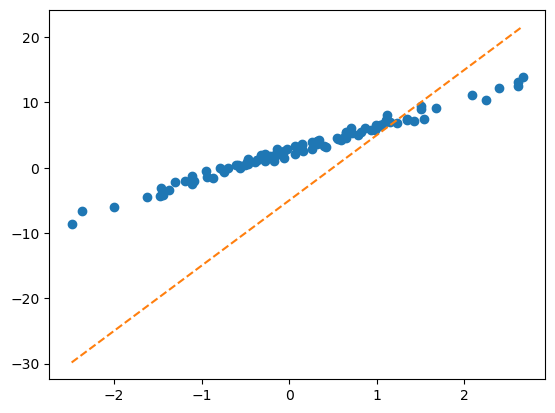
E. 추정의 방법
- 방법1: 이론적으로 추론 <- 회귀분석시간에 배운것
torch.linalg.inv((X.T @ X)) @ X.T @ y # 공식~tensor([[2.4459],
[4.0043]])plt.plot(x,y,'o')
plt.plot(x,2.4459 + 4.0043*x,'--')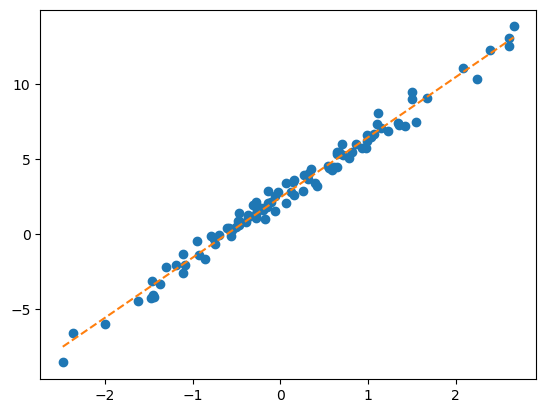
- 방법2: 컴퓨터의 반복계산을 이용하여 추론 (손실함수도입 + 경사하강법)
- 1단계: 아무 점선이나 그어본다..
- 2단계: 1단계에서 그은 점선보다 더 좋은 점선으로 바꾼다.
- 3단계: 1-2단계를 반복한다.
4. 파이토치의 반복추정
A. 문제셋팅 다시 복습
x = torch.tensor(temp).reshape(-1,1)
ones = torch.ones(100).reshape(-1,1)
X = torch.concat([ones,x],axis=1)
y = torch.tensor(sales).reshape(-1,1)B. 1단계 – 최초의 점선
What = torch.tensor([[-5.0],[10.0]],requires_grad=True)
Whattensor([[-5.],
[10.]], requires_grad=True)yhat = X@What plt.plot(x,y,'o')
plt.plot(x,yhat.data,'--') # 그림을 그리기 위해서 yhat의 미분꼬리표를 제거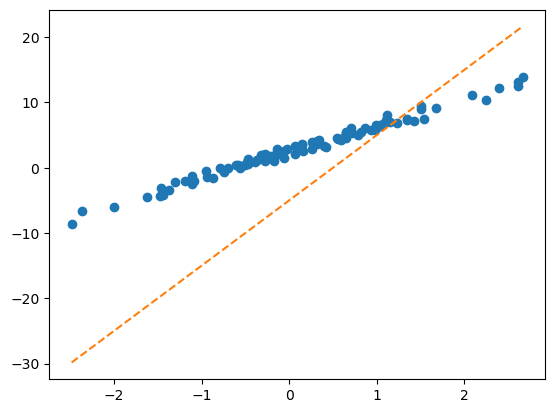
C. 2단계 – update
- ’적당한 정도’를 판단하기 위한 장치: loss function 도입!
\[loss=\sum_{i=1}^{n}(y_i-\hat{y}_i)^2=\sum_{i=1}^{n}(y_i-(\hat{w}_0+\hat{w}_1x_i))^2=({\bf y}-{\bf\hat{y}})^\top({\bf y}-{\bf\hat{y}})=({\bf y}-{\bf X}{\bf \hat{W}})^\top({\bf y}-{\bf X}{\bf \hat{W}})\]
- loss 함수의 특징
- \(y_i \approx \hat{y}_i\) 일수록 loss값이 작다.
- \(y_i \approx \hat{y}_i\) 이 되도록 \((\hat{w}_0,\hat{w}_1)\)을 잘 찍으면 loss값이 작다.
- (중요) 주황색 점선이 ‘적당할 수록’ loss값이 작다.
loss = torch.sum((y-yhat)**2)
losstensor(8587.6240, grad_fn=<SumBackward0>)- 우리의 목표: 이 loss(=8587.6240)을 더 줄이자.
- 궁극적으로는 아예 모든 조합 \((\hat{w}_0,\hat{w}_1)\)에 대하여 가장 작은 loss를 찾으면 좋겠다.
- 발상의 전환: 가만히 보니까 loss는 \(\hat{\bf W} =\begin{bmatrix} \hat{w}_0 \\ \hat{w}_1 \end{bmatrix}\) 에 따라서 값이 바뀌는 함수잖아??? 즉 아래와 같이 생각할 수 있음.
\[ loss(\hat{w}_0,\hat{w}_1) := loss(\hat{\bf W})=\sum_{i=1}^{n}(y_i-(\hat{w}_0+\hat{w}_1x_i))^2=({\bf y}-{\bf X}{\bf \hat{W}})^\top({\bf y}-{\bf X}{\bf \hat{W}})\]
따라서 구하고 싶은것은 아래와 같음
\[\hat{\bf W} := \underset{\bf W}{\operatorname{argmin}} ~ loss({\bf W})\]
- \(loss({\bf W})\)를 최소로 만드는 \({\bf W}\)를 컴퓨터로 구하는 방법, 즉 \(\hat{\bf W} := \underset{\bf W}{\operatorname{argmin}} ~ loss({\bf W})\)를 구하는 방법을 요약하면 아래와 같다.
1. 임의의 점 \(\hat{\bf W}\)를 찍는다.
2. 그 점에서 순간기울기를 구한다. 즉 \(\frac{\partial}{\partial {\bf W}}loss({\bf W})\) 를 계산한다.
3. \(\hat{\bf W}\)에서의 순간기울기2의 부호를 살펴보고 부호와 반대방향으로 움직인다. 이때 기울기의 절대값 크기3와 비례하여 보폭(=움직이는 정도)을 각각 조절한다. 즉 아래의 수식에 따라 업데이트 한다.
2 \(\frac{\partial}{\partial {\bf W}}loss({\bf W})\)
3 \(\left|\frac{\partial}{\partial {\bf W}}loss({\bf W})\right|\)
\[\hat{\bf W} \leftarrow \hat{\bf W} - \alpha \times \frac{\partial}{\partial {\bf W}}loss({\bf W})\]
- 여기에서 미분을 어떻게…?? 즉 아래를 어떻게 계산해..?
\[\frac{\partial}{\partial {\bf W}}loss({\bf W}):= \begin{bmatrix} \frac{\partial}{\partial w_0} \\ \frac{\partial}{\partial w_1}\end{bmatrix}loss({\bf W}) = \begin{bmatrix} \frac{\partial}{\partial w_0}loss({\bf W}) \\ \frac{\partial}{\partial w_1}loss({\bf W})\end{bmatrix} \]
loss.backward()를 실행하면What.grad에 미분값이 업데이트 되어요!
(실행전)
print(What.grad)None(실행후)
loss.backward()print(What.grad)tensor([[-1342.2465],
[ 1188.9203]])- 계산결과의 검토 (1)
\(loss({\bf W})=({\bf y}-\hat{\bf y})^\top ({\bf y}-\hat{\bf y})=({\bf y}-{\bf XW})^\top ({\bf y}-{\bf XW})\)
\(\frac{\partial}{\partial {\bf W}}loss({\bf W})=-2{\bf X}^\top {\bf y}+2{\bf X}^\top {\bf X W}\)
- 2 * X.T @ y + 2 * X.T @ X @ Whattensor([[-1342.2466],
[ 1188.9198]], grad_fn=<AddBackward0>)- 계산결과의 검토 (2)
\[\frac{\partial}{\partial {\bf W} } loss({\bf W})=\begin{bmatrix}\frac{\partial}{\partial w_0} \\ \frac{\partial}{\partial w_1} \end{bmatrix}loss({\bf W}) =\begin{bmatrix}\frac{\partial}{\partial w_0}loss(w_0,w_1) \\ \frac{\partial}{\partial w_1}loss(w_0,w_1) \end{bmatrix}\]
를 계산하고 싶은데 벡터미분을 할줄 모른다고 하자. 편미분의 정의를 살펴보면,
\[\frac{\partial}{\partial w_0}loss(w_0,w_1) \approx \frac{loss(w_0+h,w_1)-loss(w_0,w_1)}{h}\]
\[\frac{\partial}{\partial w_1}loss(w_0,w_1) \approx \frac{loss(w_0,w_1+h)-loss(w_0,w_1)}{h}\]
라고 볼 수 있다. 이를 이용하여 근사계산하면
def l(w0,w1):
return torch.sum((y-w0-w1*x)**2)l(-5,10), loss # 로스값일치(tensor(8587.6240), tensor(8587.6240, grad_fn=<SumBackward0>))h=0.001
(l(-5+h,10) - l(-5,10))/htensor(-1342.7733)h=0.001
(l(-5,10+h) - l(-5,10))/htensor(1189.4531)이 값은 What.grad에 저장된 값과 거의 비슷하다.
What.gradtensor([[-1342.2465],
[ 1188.9203]])- 이제 아래의 공식에 넣고 업데이트해보자
\[\hat{\bf W} \leftarrow \hat{\bf W} - \alpha \times \frac{\partial}{\partial {\bf W}}loss({\bf W})\]
alpha = 0.001
print(f"{What.data} -- 수정전")
print(f"{-alpha*What.grad} -- 수정하는폭")
print(f"{What.data-alpha*What.grad} -- 수정후")
print(f"{torch.linalg.inv((X.T @ X)) @ X.T @ y} -- 회귀분석으로 구한값")
print(f"{torch.tensor([[2.5],[4]])} -- 참값(이건 비밀~~)")tensor([[-5.],
[10.]]) -- 수정전
tensor([[ 1.3422],
[-1.1889]]) -- 수정하는폭
tensor([[-3.6578],
[ 8.8111]]) -- 수정후
tensor([[2.4459],
[4.0043]]) -- 회귀분석으로 구한값
tensor([[2.5000],
[4.0000]]) -- 참값(이건 비밀~~)- alpha를 잘 잡아야함~
- 1회 수정결과를 시각화
Wbefore = What.data
Wafter = What.data - alpha * What.grad
Wbefore, Wafter(tensor([[-5.],
[10.]]),
tensor([[-3.6578],
[ 8.8111]]))plt.plot(x,y,'o',label=r'observed data')
plt.plot(x,X@Wbefore,'--', label=r"$\hat{\bf y}_{before}={\bf X}@\hat{\bf W}_{before}$")
plt.plot(x,X@Wafter,'--', label=r"$\hat{\bf y}_{after}={\bf X}@\hat{\bf W}_{after}$")
plt.legend()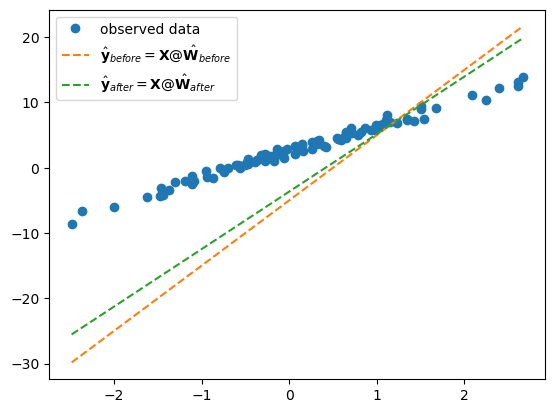
D. 3단계 – iteration (=learn = estimate \(\bf{\hat W}\))
x = torch.tensor(temp).reshape(-1,1)
ones = torch.ones(100).reshape(-1,1)
X = torch.concat([ones,x],axis=1)
y = torch.tensor(sales).reshape(-1,1)What = torch.tensor([[-5.0],[10.0]],requires_grad=True)
Whattensor([[-5.],
[10.]], requires_grad=True)for epoc in range(30):
yhat = X @ What
loss = torch.sum((y-yhat)**2)
loss.backward()
What.data = What.data - 0.001 * What.grad
What.grad = Noneplt.plot(x,y,'o', label = "ovserved data")
plt.plot(x,X@What.data,'--', label = r"$\hat{\bf y}={\bf X}@\hat{\bf W}$ after 30 iterations (=epochs)")
plt.legend()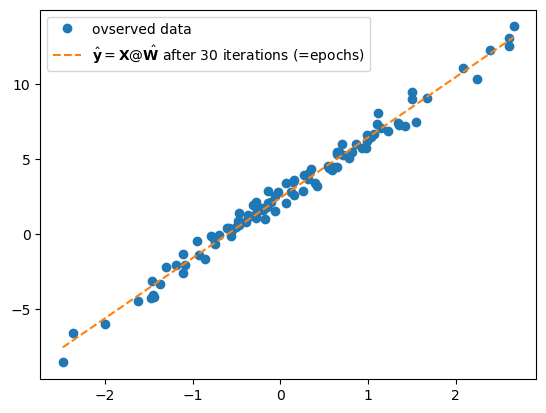
5. 파라메터의 학습과정 음미
A. 단순무식한 print
What = torch.tensor([[-5.0],[10.0]],requires_grad=True)
alpha = 0.001
print(f"시작값 = {What.data.reshape(-1)}")
for epoc in range(30):
yhat = X @ What
loss = torch.sum((y-yhat)**2)
loss.backward()
What.data = What.data - 0.001 * What.grad
print(f'loss = {loss:.2f} \t 업데이트폭 = {-0.001 * What.grad.reshape(-1)} \t 업데이트결과: {What.data.reshape(-1)}')
What.grad = None시작값 = tensor([-5., 10.])
loss = 8587.62 업데이트폭 = tensor([ 1.3422, -1.1889]) 업데이트결과: tensor([-3.6578, 8.8111])
loss = 5675.18 업데이트폭 = tensor([ 1.1029, -0.9499]) 업데이트결과: tensor([-2.5548, 7.8612])
loss = 3755.63 업데이트폭 = tensor([ 0.9056, -0.7596]) 업데이트결과: tensor([-1.6492, 7.1016])
loss = 2489.58 업데이트폭 = tensor([ 0.7431, -0.6081]) 업데이트결과: tensor([-0.9061, 6.4935])
loss = 1654.04 업데이트폭 = tensor([ 0.6094, -0.4872]) 업데이트결과: tensor([-0.2967, 6.0063])
loss = 1102.33 업데이트폭 = tensor([ 0.4995, -0.3907]) 업데이트결과: tensor([0.2028, 5.6156])
loss = 737.85 업데이트폭 = tensor([ 0.4091, -0.3136]) 업데이트결과: tensor([0.6119, 5.3020])
loss = 496.97 업데이트폭 = tensor([ 0.3350, -0.2519]) 업데이트결과: tensor([0.9469, 5.0501])
loss = 337.72 업데이트폭 = tensor([ 0.2742, -0.2025]) 업데이트결과: tensor([1.2211, 4.8477])
loss = 232.40 업데이트폭 = tensor([ 0.2243, -0.1629]) 업데이트결과: tensor([1.4453, 4.6848])
loss = 162.73 업데이트폭 = tensor([ 0.1834, -0.1311]) 업데이트결과: tensor([1.6288, 4.5537])
loss = 116.64 업데이트폭 = tensor([ 0.1500, -0.1056]) 업데이트결과: tensor([1.7787, 4.4481])
loss = 86.13 업데이트폭 = tensor([ 0.1226, -0.0851]) 업데이트결과: tensor([1.9013, 4.3629])
loss = 65.94 업데이트폭 = tensor([ 0.1001, -0.0687]) 업데이트결과: tensor([2.0014, 4.2942])
loss = 52.57 업데이트폭 = tensor([ 0.0818, -0.0554]) 업데이트결과: tensor([2.0832, 4.2388])
loss = 43.72 업데이트폭 = tensor([ 0.0668, -0.0447]) 업데이트결과: tensor([2.1500, 4.1941])
loss = 37.86 업데이트폭 = tensor([ 0.0545, -0.0361]) 업데이트결과: tensor([2.2045, 4.1579])
loss = 33.98 업데이트폭 = tensor([ 0.0445, -0.0292]) 업데이트결과: tensor([2.2490, 4.1287])
loss = 31.41 업데이트폭 = tensor([ 0.0363, -0.0236]) 업데이트결과: tensor([2.2853, 4.1051])
loss = 29.70 업데이트폭 = tensor([ 0.0296, -0.0191]) 업데이트결과: tensor([2.3150, 4.0860])
loss = 28.58 업데이트폭 = tensor([ 0.0242, -0.0155]) 업데이트결과: tensor([2.3391, 4.0705])
loss = 27.83 업데이트폭 = tensor([ 0.0197, -0.0125]) 업데이트결과: tensor([2.3589, 4.0580])
loss = 27.33 업데이트폭 = tensor([ 0.0161, -0.0101]) 업데이트결과: tensor([2.3749, 4.0479])
loss = 27.01 업데이트폭 = tensor([ 0.0131, -0.0082]) 업데이트결과: tensor([2.3881, 4.0396])
loss = 26.79 업데이트폭 = tensor([ 0.0107, -0.0067]) 업데이트결과: tensor([2.3988, 4.0330])
loss = 26.65 업데이트폭 = tensor([ 0.0087, -0.0054]) 업데이트결과: tensor([2.4075, 4.0276])
loss = 26.55 업데이트폭 = tensor([ 0.0071, -0.0044]) 업데이트결과: tensor([2.4146, 4.0232])
loss = 26.49 업데이트폭 = tensor([ 0.0058, -0.0035]) 업데이트결과: tensor([2.4204, 4.0197])
loss = 26.45 업데이트폭 = tensor([ 0.0047, -0.0029]) 업데이트결과: tensor([2.4251, 4.0168])
loss = 26.42 업데이트폭 = tensor([ 0.0038, -0.0023]) 업데이트결과: tensor([2.4289, 4.0145])B. 반복시각화 – yhat의 관점에서!
What = torch.tensor([[-5.0],[10.0]],requires_grad=True)
alpha = 0.001
fig = plt.plot(x,y,'o',label = "observed")
plt.plot(x,X@What.data,'--',color="C1")
for epoc in range(30):
yhat = X @ What
loss = torch.sum((y-yhat)**2)
loss.backward()
What.data = What.data - 0.001 * What.grad
plt.plot(x,X@What.data,'--',color="C1",alpha=0.1)
What.grad = None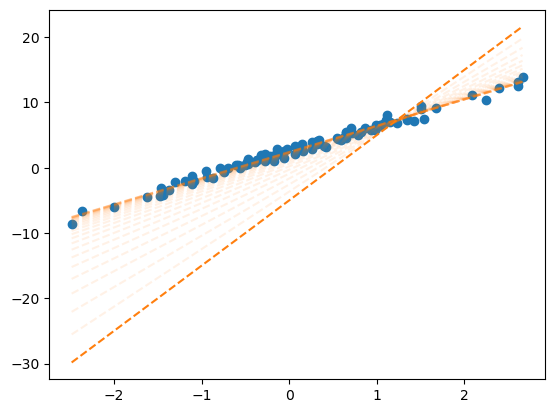
C. 반복시각화 – loss의 관점에서!!
def plot_loss():
fig = plt.figure()
ax = fig.add_subplot(projection='3d')
w0 = np.arange(-6, 11, 0.5)
w1 = np.arange(-6, 11, 0.5)
W1,W0 = np.meshgrid(w1,w0)
LOSS=W0*0
for i in range(len(w0)):
for j in range(len(w1)):
LOSS[i,j]=torch.sum((y-w0[i]-w1[j]*x)**2)
ax.plot_surface(W0, W1, LOSS, rstride=1, cstride=1, color='b',alpha=0.1)
ax.azim = 30 ## 3d plot의 view 조절
ax.dist = 8 ## 3d plot의 view 조절
ax.elev = 5 ## 3d plot의 view 조절
ax.set_xlabel(r'$w_0$') # x축 레이블 설정
ax.set_ylabel(r'$w_1$') # y축 레이블 설정
ax.set_xticks([-5,0,5,10]) # x축 틱 간격 설정
ax.set_yticks([-5,0,5,10]) # y축 틱 간격 설정
return figl(-5,10)tensor(8587.6240)fig = plot_loss()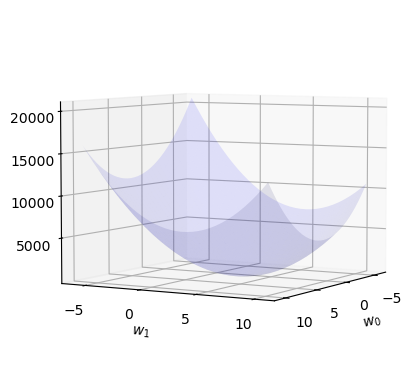
fig = plot_loss()
ax = fig.gca()
ax.scatter(2.5, 4, l(2.5,4), s=200, marker='*', color='red', label=r"${\bf W}=[2.5, 4]'$")
ax.scatter(-5, 10, l(-5,10), s=200, marker='*', color='blue', label=r"initial $\hat{\bf W}=[-5, 10]'$")
ax.legend()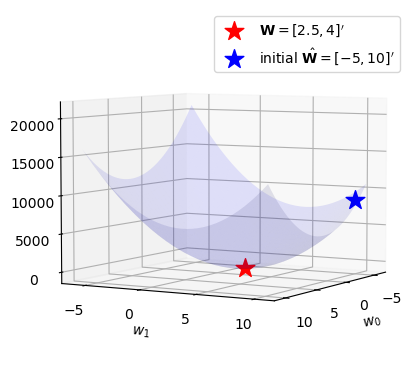
w0,w1 = What.data.reshape(-1)What.datatensor([[2.4289],
[4.0145]])w0,w1(tensor(2.4289), tensor(4.0145))What = torch.tensor([[-5.0],[10.0]],requires_grad=True)
alpha = 0.001
for epoc in range(30):
yhat = X @ What
loss = torch.sum((y-yhat)**2)
loss.backward()
What.data = What.data - 0.001 * What.grad
w0,w1 = What.data.reshape(-1)
ax.scatter(w0,w1,l(w0,w1),s=5,marker='o',color='blue')
What.grad = Nonefig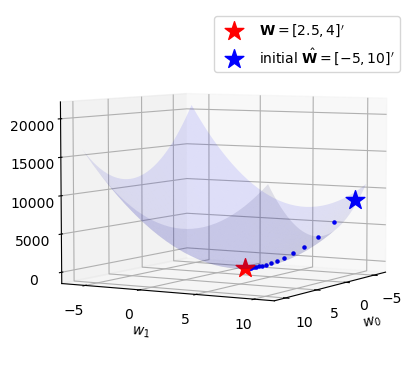
D. 애니메이션
from matplotlib import animationplt.rcParams['figure.figsize'] = (7.5,2.5)
plt.rcParams["animation.html"] = "jshtml" def show_animation(alpha=0.001):
## 1. 히스토리 기록을 위한 list 초기화
loss_history = []
yhat_history = []
What_history = []
## 2. 학습 + 학습과정기록
What= torch.tensor([[-5.0],[10.0]],requires_grad=True)
What_history.append(What.data.tolist())
for epoc in range(30):
yhat=X@What ; yhat_history.append(yhat.data.tolist())
loss=torch.sum((y-yhat)**2); loss_history.append(loss.item())
loss.backward()
What.data = What.data - alpha * What.grad; What_history.append(What.data.tolist())
What.grad = None
## 3. 시각화
fig = plt.figure()
ax1 = fig.add_subplot(1, 2, 1)
ax2 = fig.add_subplot(1, 2, 2, projection='3d')
#### ax1: yhat의 관점에서..
ax1.plot(x,y,'o',label=r"$(x_i,y_i)$")
line, = ax1.plot(x,yhat_history[0],label=r"$(x_i,\hat{y}_i)$")
ax1.legend()
#### ax2: loss의 관점에서..
w0 = np.arange(-6, 11, 0.5)
w1 = np.arange(-6, 11, 0.5)
W1,W0 = np.meshgrid(w1,w0)
LOSS=W0*0
for i in range(len(w0)):
for j in range(len(w1)):
LOSS[i,j]=torch.sum((y-w0[i]-w1[j]*x)**2)
ax2.plot_surface(W0, W1, LOSS, rstride=1, cstride=1, color='b',alpha=0.1)
ax2.azim = 30 ## 3d plot의 view 조절
ax2.dist = 8 ## 3d plot의 view 조절
ax2.elev = 5 ## 3d plot의 view 조절
ax2.set_xlabel(r'$w_0$') # x축 레이블 설정
ax2.set_ylabel(r'$w_1$') # y축 레이블 설정
ax2.set_xticks([-5,0,5,10]) # x축 틱 간격 설정
ax2.set_yticks([-5,0,5,10]) # y축 틱 간격 설정
ax2.scatter(2.5, 4, l(2.5,4), s=200, marker='*', color='red', label=r"${\bf W}=[2.5, 4]'$")
ax2.scatter(-5, 10, l(-5,10), s=200, marker='*', color='blue')
ax2.legend()
def animate(epoc):
line.set_ydata(yhat_history[epoc])
ax2.scatter(np.array(What_history)[epoc,0],np.array(What_history)[epoc,1],loss_history[epoc],color='grey')
fig.suptitle(f"alpha = {alpha} / epoch = {epoc}")
return line
ani = animation.FuncAnimation(fig, animate, frames=30)
plt.close()
return aniepoch = 0 부터 시작하여 시작점에서 출발하도록 애니메이션을 수정했습니당.
ani = show_animation(alpha=0.001)
aniE. 학습률에 따른 시각화
- \(\alpha\)가 너무 작다면 비효율적임
show_animation(alpha=0.0001)- \(\alpha\)가 크다고 무조건 좋은건 또 아님
show_animation(alpha=0.0083)- 수틀리면 수렴안할수도??
show_animation(alpha=0.0085)- 그냥 망할수도??
show_animation(alpha=0.01)6. HW
학습률\((\alpha\))를 조정하면서 실습해보고 스크린샷 제출
A1. 벡터미분
A. 해결하고 싶은것
아래와 같은 선형모형이 있다고 가정하자.
\[{\bf y}={\bf X}{\boldsymbol \beta} + {\boldsymbol \epsilon}\]
이러한 모형에 대하여 아래와 같이 손실함수를 정의하자.
\[loss({\boldsymbol \beta}) = ({\bf y} - {\bf X}{\boldsymbol \beta})^\top({\bf y} - {\bf X}{\boldsymbol \beta}) \]
이때 손실함수의 미분값을 아래와 같이 주어지고,
\[\frac{\partial}{\partial {\boldsymbol \beta}}loss({\boldsymbol \beta}) = -2{\bf X}^\top{\bf y}+2{\bf X}^\top{\bf X}{\boldsymbol \beta}\]
따라서 손실함수를 최소화하는 추정량이 아래와 같이 주어짐을 보여라.
\[\hat{\boldsymbol \beta} = ({\bf X}^\top {\bf X})^{-1}{\bf X}^\top{\bf y}\]
B. 해설강의 및 보충자료
https://github.com/guebin/DL2024/blob/main/posts/02wksupp.pdf